Turn scanner matches into useful Discord or webhook alerts
Design an alert that explains the market, rule, and next check; distinguish saved scanner conditions, recorded triggers, and actual notification receipts.
A useful trading alert tells you which market matched, what condition mattered, and what to inspect next. “BTC signal!” leaves too much work for the recipient. A concise message with the venue, interval, rule, and review action is easier to evaluate and journal.
This guide uses a real saved demo scanner and the current alert configuration controls. The new scanner stays disabled: its saved message and conditions are verified, but no new match or notification delivery is claimed. A separate retained scanner experiment supplies an actual zero-trigger observation. The payload examples below are teaching examples, not received messages.
Write the review request before connecting a destination
Start with the decision the notice should support. A scanner can ask you to inspect a candle; it does not establish an order size, exit, fill price, or profitable trade.
For a first alert, include:
- Market: symbol, venue, and spot or contract type.
- Rule: a name that describes the condition rather than its hoped-for result.
- Interval: the candles used by the condition.
- Time: distinguish the alert time from the candle being reviewed.
- Next check: one concrete action, such as verifying the chart and data freshness.
Our saved Alert message expression requests this text:
Stratifyre’s strategy rule editor exposes an Alert action. The current custom scanner editor shows conditions without a separate message editor; our message was saved through the supported API and checked by readback. Do not assume a conditions screenshot establishes the message that a recipient will receive.
Keep the message free of webhook URLs, tokens, account details, and broad mentions such as @everyone. Discord’s webhook specification describes incoming webhooks as channel destinations and provides allowed_mentions for controlling mentions. A custom receiver that formats Discord messages should decide its mention policy explicitly.
Save explicit conditions and keep timing separate
The configuration example monitors one exact instrument: CRYPTO:BINANCE:BTCUSDT, representing Binance spot BTCUSDT in the product search. The rule requests a prior one-minute candle whose close exceeds both its open and the preceding close.
Additional AND conditions request consecutive one-minute timestamps and a tested-bar age of at least one minute but less than three minutes. These are saved safeguards. Without an executed trigger and its source candles, this example does not prove that the runtime selected a completed candle or applied the freshness checks correctly.

bars['1m'].close[1] > bars['1m'].open[1]. Four additional AND conditions cover the preceding close, consecutive timestamps, and requested age limits; the scanner remains disabled.The saved schedule is Every minute with 24/7 market hours. The candle interval, evaluation frequency, and delivery time describe different stages. Checking every minute is not a promise that a message arrives exactly at a candle close.

Before activation, read back the instrument, conditions, message, and repeat settings. An accepted request or generated description alone is insufficient. Freeze those settings during the observation so an empty result does not invite an undocumented threshold change.
Choose Discord or a generic webhook deliberately
The real Settings > Alerts view contains a master toggle, channel selection, and Minimum seconds between alerts. These preferences apply to the account’s alert delivery. They are separate from the scanner’s conditions and rule trigger limits.
Our demo had the master switch enabled, Email selected, and 60-second spacing. Discord and generic Webhook were unselected. We left those preferences unchanged and kept the new scanner disabled so this article would not notify a real recipient.
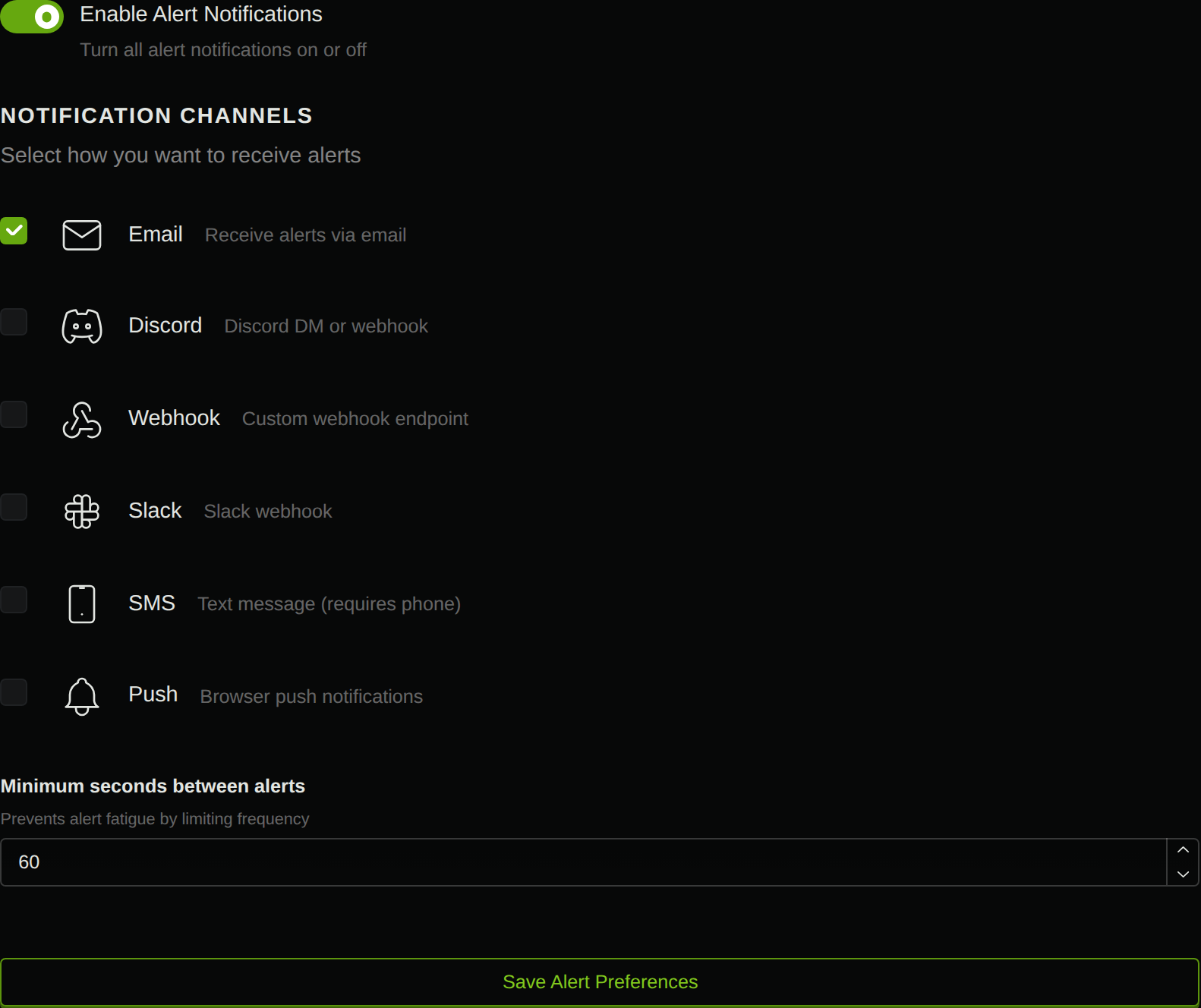
Use Discord for a channel notice. Its configuration accepts a Discord webhook URL. The current delivery implementation constructs an embed with the rule name, message, instrument, and alert time. This describes the implementation’s mapping; we did not observe a Discord message from this account.
Use Webhook when your own receiver needs a structured event for a journal or review queue. Its configuration includes an HTTPS URL and an optional signing secret. The generic event body is different from Discord’s message body; selecting a destination does not convert arbitrary JSON into a Discord post.
Understand what the native payload supplies
The following is a synthetic teaching example of the envelope defined by the current generic webhook implementation. The identifier, time, and message are invented; no request with this body was sent or received.
{ "event": "alert.triggered", "timestamp": "2026-10-02T12:03:00Z", "data": { "alertId": "illustrative-alert-id", "instrumentId": "CRYPTO:BINANCE:BTCUSDT", "message": "Review the prior 1m candle; verify the chart before acting.", "ruleName": "Prior 1m green close above preceding close", "metadata": {"source": "scanner"} }}The timestamp represents the alert’s trigger time. It does not automatically provide the matched candle’s timestamp. Current scanner metadata supplies the scanner source marker; do not assume the payload also contains the exact close, threshold, OHLC values, or chart link.
A useful receiving journal can store the alert identifier, receipt time, rule, instrument, and review outcome. Add candle-level values only when you have obtained and reconciled them. Repeating an alert identifier can indicate another delivery attempt; another identifier can represent a repeated condition. Those are different duplicate questions.
When a generic webhook secret is configured, the current sender computes HMAC-SHA256 over the exact JSON body and includes X-Stratifyre-Signature in sha256=<hex> form. A receiver should verify the raw request bytes before processing the body. Signing is separate from deciding whether the alert is recent and whether it has already been processed.
Discord accepts its own message fields, including content and embeds, as documented in the execution parameters. If you build a receiver that forwards generic alerts to Discord, it must format that message deliberately. That forwarding service is your integration, not an observed native workflow in this guide.
Diagnose the first missing stage
A quiet channel cannot tell you where the workflow stopped. Inspect the stages in order:
- Data and evaluation. Verify the intended market, loaded candles, and evaluation timestamp.
- Recorded trigger. Find a history row for the instrument and time; a proximity row alone is insufficient.
- Alert record and routing. Check the rule/message, master switch, selected channels, and any reported suppression or failure.
- Receipt. Locate the message in the intended channel or the event in your receiver's journal.
The retained crypto breakout experiment checked Binance BTCUSDT and ETHUSDT in a bounded observation. Six successful polls recorded zero historical triggers; its returned evaluation timestamp was null. It was stopped afterward, with stop acknowledgement and active entitlement release recorded. That observation establishes an empty recorded history, not that the market contained no breakout or that delivery works.
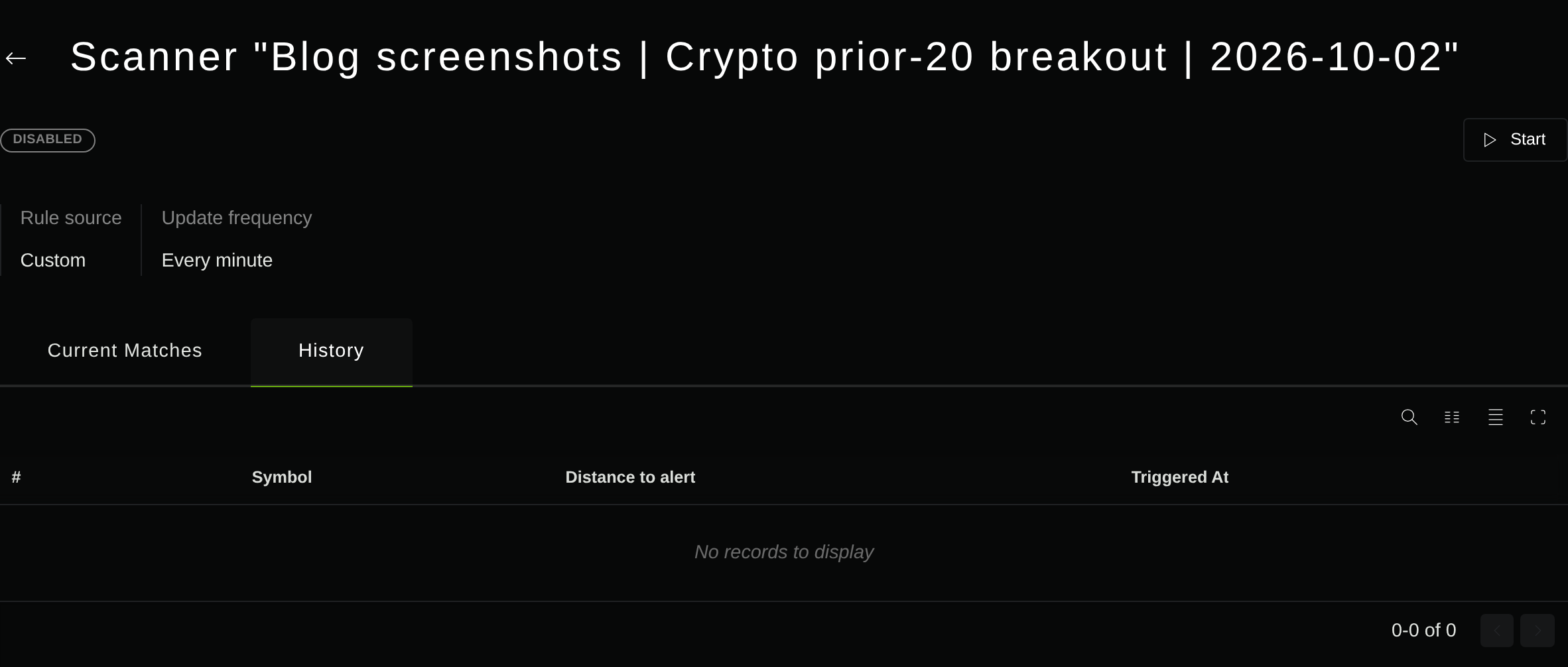
Read the earlier crypto watchlist scanner walkthrough for that experiment’s rules and limits. Neither a “Current Matches” row nor a displayed zero distance substitutes for a persisted trigger and reconciled candle.
Control repeats and verify a receipt before relying on alerts
The new saved rule requests Once per 3m. The account’s 60-second delivery spacing is a separate control. Neither setting establishes one notice per completed candle or exactly-once receipt. Decide whether your review journal treats a persistent condition as one setup or several reminders.
For a Discord integration you own, Discord documents that wait affects server confirmation and the returned message body. Its rate-limit guidance also tells clients to use the returned limits and retry information. Do not treat an HTTP success alone as proof that a person saw and acted on a notice.
Start with one instrument and one understandable message. Use the scanner alert configuration guide to inspect routing, then verify a recorded trigger and an actual receipt in a destination you control before depending on the workflow. The useful outcome is an auditable review request, with each stage supported by evidence.
Put your strategy rules to the test
Build your strategy, inspect historical trades, and review the assumptions behind your results.
Build and test your strategy