Futures margin presets: why one entry opens and another is rejected
See a controlled two-policy margin check, select a saved preset in a backtest, and verify the copied rates against the first order decision.
Your strategy produces a buy signal for one futures contract. The account has $10,000. Does the position open? A configured $5,000 margin requirement leaves room for it; a $15,000 requirement exceeds the account’s equity before the first trade.
That is the question to answer before interpreting an empty trade list. Here is a controlled example of both decisions, followed by the steps to save a margin policy, select it for a backtest, and check what the run actually used.
One signal, two margin requirements
We ran Stratifyre’s local Rust simulator twice with five synthetic, flat-price bars. Every bar opened, reached its high and low, and closed at 4,000. Each run started with $10,000, no positions, and a rule to buy one contract once when price was above zero. Only the margin override changed.
The lower requirement produced a fill. The higher requirement produced an explicit InsufficientMargin rejection.
| Per-contract margin | Opening check |
|---|---|
| $5,000 | $5,000 calculated headroom; order filled |
| $15,000 | −$5,000 calculated headroom; order rejected |
Initial headroom is author arithmetic: starting equity minus quantity × required margin. With one contract and no other positions or orders, that is $10,000 − $5,000 or $10,000 − $15,000. It explains the comparison; it is not a maximum-loss allowance.
These are observed local simulator results with invented prices, not historical ES returns or completed jobs in the hosted application. The retained inputs and native output contain both scenarios. Flat prices deliberately remove market gains and losses from the question.
Keep margin separate from trade risk
Futures margin is collateral required to support a position, rather than a down payment on the underlying asset. Exchange initial and maintenance requirements serve different purposes, brokers can require additional funds, and requirements can change. CME explains these distinctions.
In a backtest, keep three amounts separate:
- Account equity: the capital available when the order is checked.
- Required margin: the collateral demanded by the selected simulation policy.
- Planned stop loss: the loss implied by contract quantity, point value, and stop distance, before costs and execution effects.
Reducing the configured margin does not reduce the dollars lost per adverse price point. Our fixture explicitly supplies a $50-per-point contract multiplier; a hypothetical ten-point adverse move in one contract would therefore mean $500 before costs. That is a separate calculation, not a move observed in the flat-price example.
Stratifyre currently uses one active margin threshold for both opening positions and subsequent margin calls/liquidation. Its Intraday and Overnight fields choose the threshold by session; they are not separate initial and maintenance margin schedules. The amounts below are chosen simulation inputs, not current broker quotes.
Save the policy, then select it for the run
A preset is useful because it makes the collateral assumption repeatable. The important step is selecting it in the backtest draft, then checking the copied numbers.
- Open Settings → Futures Margin Presets and choose Create Preset. Give the policy a recognizable name, such as “ES margin example — 5000.”
- Set the default Intraday margin and Overnight margin to $12,500. Under Advanced rules → Contract overrides, choose Add override and enter
FUT:CME:ES, with $5,000 for both contract margin fields. Save the preset. - Create a second preset with the same fallback and cutoff, changing only the override to $15,000 for both periods. Neither needs to become the account default.
- Open your strategy’s backtest form and choose Advanced. In Futures margin preset, select the intended saved policy under My presets. Manage margin presets opens the manager from this form if you need it.
- Inspect the copied Margin rules before starting. Check both the fallback rates and the contract override; the preset’s name alone is not enough.
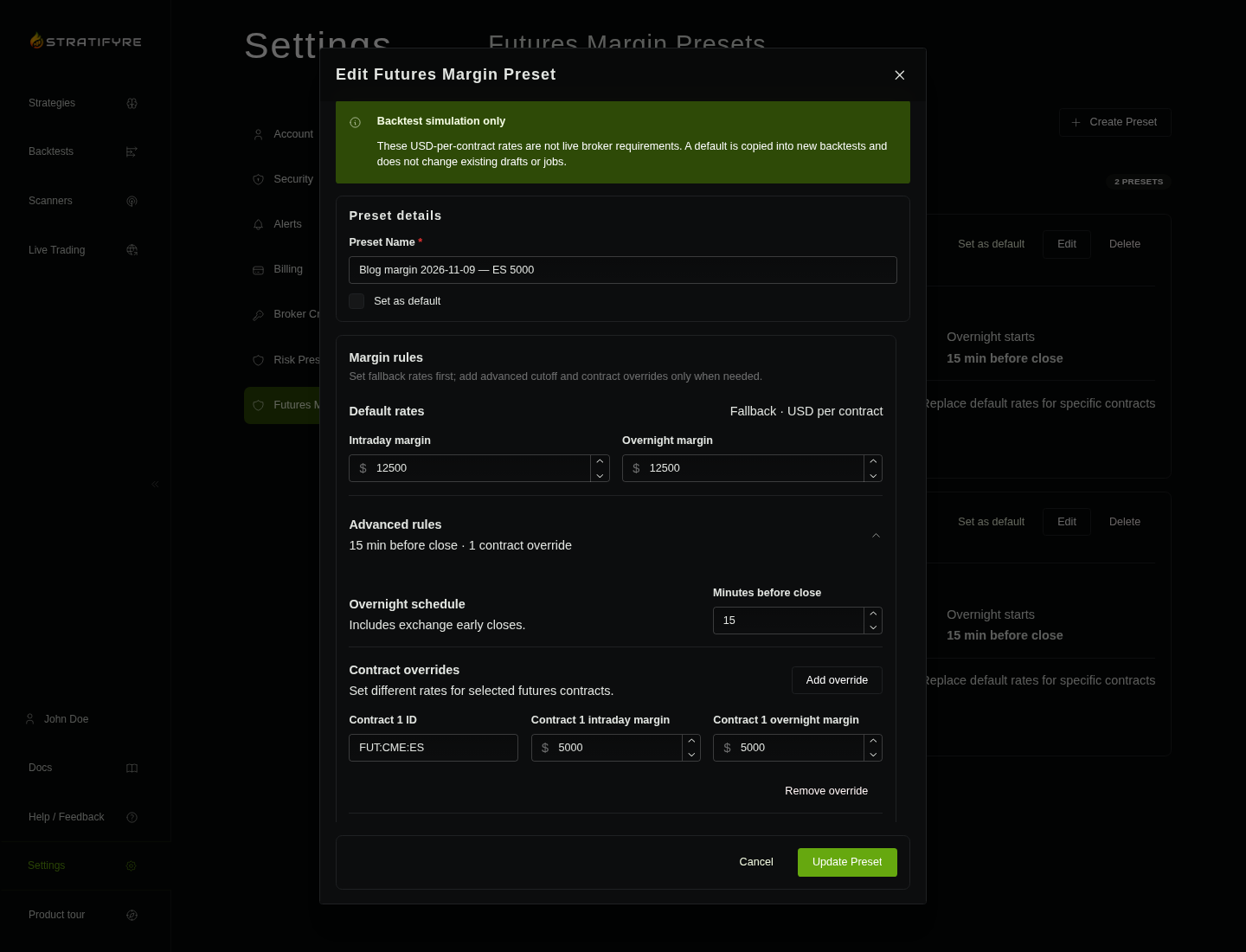
The example instrument identity is FUT:CME:ES.c.0, a continuous-series identifier whose margin lookup uses the FUT:CME:ES root override. An instrument without a matching override uses the fallback. Always check the identity you selected rather than assuming every futures symbol receives the pictured rate.
Both policies use the same amount intraday and overnight, with a cutoff 15 minutes before exchange close. That keeps a session change from changing this comparison’s requirement. Selecting a preset copies its settings into the draft; later edits to the saved preset do not rewrite an existing run.
Check the saved rates and the first order
After starting your own run, open Configuration → Futures Margin. Compare the Default row and contract-specific row with the values you intended to submit. If they differ, correct a new draft before treating the runs as a margin comparison.
Then open Events and find the first order decision. A fill tells you the order opened; an InsufficientMargin rejection tells you this collateral check prevented it. An empty trade list cannot distinguish a rejected order from a strategy that never signaled. Events are listed newest first, so follow their timestamps when reconstructing the sequence.
In our local example, the $5,000 policy submitted its order at 14:30 UTC and filled one contract at 4,000 at 14:31 UTC. The $15,000 policy rejected the order at 14:30 UTC. These timestamps belong to the synthetic March 11, 2024 fixture; they are not a historical market observation.
The fixture used one-minute bars, on-close evaluation with close-price fills, zero fees/slippage/market impact, no tax, and no end-of-run flattening. The lower-policy position remained open through the last bar; neither run generated a margin call or liquidation. Those settings isolate the opening decision. They do not test how much a strategy can lose or whether a position survives a changing market or overnight requirement.
Finish with one verified decision
For your next backtest, select one saved margin preset, verify its copied rates in Configuration, and identify the first fill or rejection in Events. Those two checks establish a useful result: which collateral assumption the run used, and whether the first order could open under it.
If an order is rejected, compare its quantity and applicable per-contract rate with the available equity, including other positions and pending orders. A lower margin input can change acceptance, but it cannot establish that the trade is affordable for your risk budget. Use the separate NQ/MNQ contract-risk guide for point-value and stop sizing, and the trailing drawdown guide for an account loss-floor constraint.
Test a futures setup across sessions
Run the rules against historical futures data and inspect how timing shapes the trades.
$50 in free credits
For eligible new accounts. Terms apply.